Miscellaneous iBank Helpful FAQs
- Currency Conversion – When a report is run, the rate of conversion is based on the check-out date for hotel or the invoice date.
- On The Road Dates –
- How this report is calculated, is it looks at all aspects of the trip, car/air/rail/service fees/hotel, and doesn't take into account that these days can be on the same trip.
- Therefore, it is including duplicates.
- It also counts days for all tickets involved in Exchanges on each PNR which can also add additional days to the calculation.
- Negative amounts are from the credits involved with the trip.
- Top Travelers – Combined Days on the road calculation (Cornerstone Case #00449387)
- Cornerstone came back to us and advised that the Days on the Road uses many different calculations, which includes air car and hotel data.
- We discovered it is also capturing misc. segments, such as vendor items, which could have a return date several months after the trip begins. This is what is causing the huge figures for Days on the road.
- We are no longer importing misc segments from Central Command into iBank. We are looking into removing the misc segments data from the historical data in iBank.
- Flight Duration - Flight duration is only available for reservation data since iBank would have no way of keeping track of time zones, or year specific differences to be able to calculate it accurately.
- CO2 reporting – Co2 reporting is available on following “Standard” reports and should be run using RESERVATION data and not BACK OFFICE data:
- Air Activity, Co2 Air Summary, Co2 Combined Summary, Executive Summary with Graphs, Executive Summary Year to Year, Top/Bottom City Pair, Top Travelers - Combined, and Travel Management Summary.
- CO2 calculation is different based on “Standard” reports and “Custom” built reports. See CIS Carbon Methodology document for more info.
- Custom CO2 reports with saved filters are: • GDS Where are my Travelers with CO2 • GDS Where are my Travelers with CO2 and breaks • DT STD Hotel CO2 CAD • DT STD Hotel CO2 USD • DT STD Car CO2 CAD • DT STD Car CO2 USD • CO2 Air Car Hotel Report CAD • CO2 Air Car Hotel Report USD
- Pseudo City Codes (PCCs) – Codes will show on Back Office and Reservation data in iBank reporting.
- Passengers on a Plane report- Groups by the “Break” fields if set up under that user and not by the flight. To get ALL passengers on the flight regardless if the Break field match choose the option to “ignore all break settings”
- Top/ Bottom Cost Center- Allows you to group by the “Break” fields that are in U71,72,73 in the data for the client. Can only group by 1 and not multiple.
- Executive Summary YOY to get Fiscal Year instead of calendar year
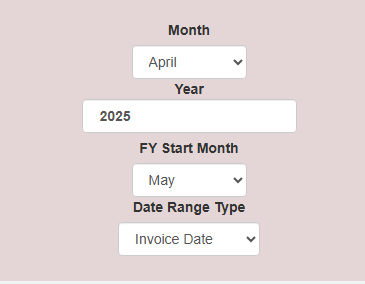
Sample of Fiscal of May 2024-April 2025
Top Month is last month of Fiscal ( April)
Year is end of Fiscal (2025)
FY Start Month is first month of fiscal year ( May)
Run report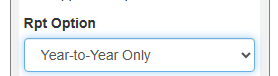
Was this article helpful?
That’s Great!
Thank you for your feedback
Sorry! We couldn't be helpful
Thank you for your feedback
Feedback sent
We appreciate your effort and will try to fix the article