What is a Picklist?
Picklists are used to quickly generate selections of data when running iBank reports. They can be created for all the categories shown below.

*NOTE: The following instructions can be used to create picklists under all categories shown above.*
One of the most popular picklist options is 'Accounts'. When an account has several DKs, Account Picklists offer users the ability group DK lists, instead of having to add each DK to reports manually.
How to create a Picklist
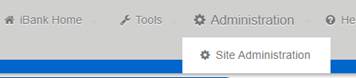
On the top left-hand corner of the screen, hover mouse over 'Administration', then click 'Site Administration':
From the 'Admin Site Map' page, click desired category option under 'Picklists':
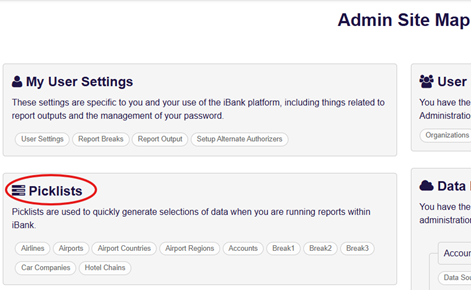
To create a new Accounts Picklist, click the 'Accounts' selection.
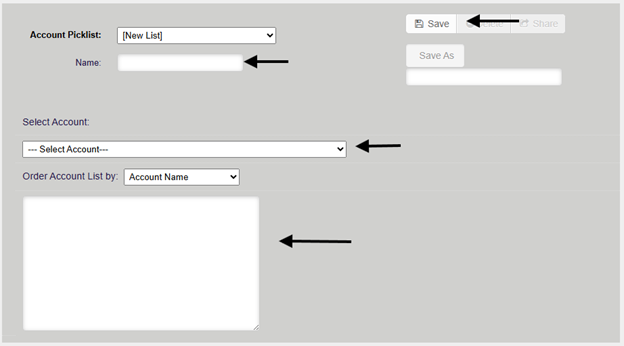
From the Account Picklist window:
1. First, name your picklist in the 'Name' field.
2. Select all desired accounts using the 'Select Account' drop-down OR copy and paste your list directly into the open box.
3. Click 'Save' to create your new picklist.
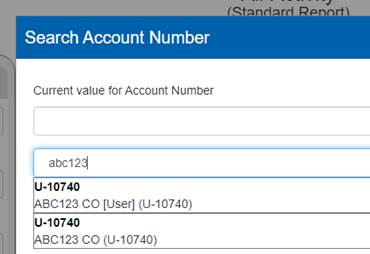
Your picklist will assign a new 7-digit DK# as shown below: (ex. U-10740)
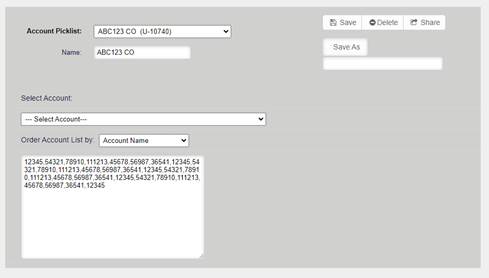
*NOTE: Picklists can be adjusted any time by coming back to this picklist page, adding or removing values, then clicking 'Save'. *
Once a picklist is created, it will be searchable within the ‘Account Number’ reporting fields as shown below:
Was this article helpful?
That’s Great!
Thank you for your feedback
Sorry! We couldn't be helpful
Thank you for your feedback
Feedback sent
We appreciate your effort and will try to fix the article