How to Adjust iBank Break Settings
*NOTE: Break field settings cannot be managed on a report level. These settings must be adjusted under Administration settings, and will apply to all reports that allow for break fields.*
**These directions only apply to Standard Reports. Custom reports must have break fields built into the individual report.**
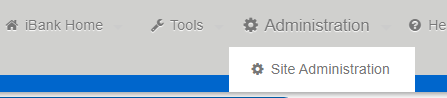
On the top left-hand corner of the screen, hover mouse over 'Administration', then click 'Site Administration':
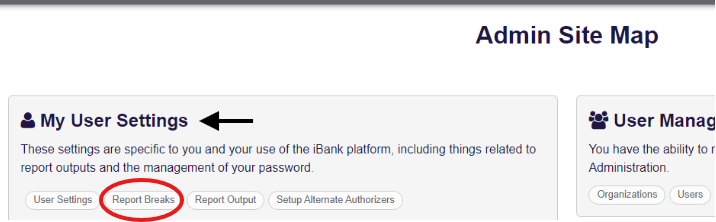
From the 'Admin Site Map' page, click 'Report Breaks' under 'My User Settings':
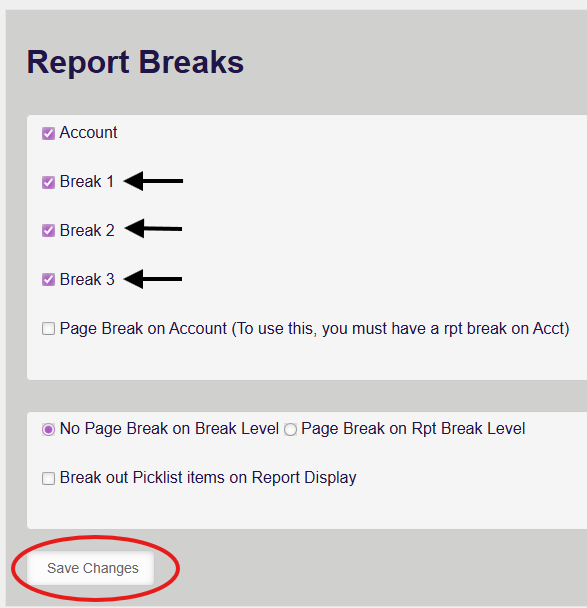
Click on the 'Report Breaks' tab, and check/uncheck Break options as needed.
Then, click 'Save Changes':
After saving changes, go back to reports and run normally. The break field options will reflect what is saved in the Report Breaks setting page.
Was this article helpful?
That’s Great!
Thank you for your feedback
Sorry! We couldn't be helpful
Thank you for your feedback
Feedback sent
We appreciate your effort and will try to fix the article