How to Filter Breaks and UDIDs
What are Breaks/UDIDs?
UDIDs are Unique Data Identifiers that allow us to capture reportable client data. UDIDs can be Standard, Flex, or Break fields. Standard UDIDs are provided to all clients, while Flex and Breaks are client specific.
- Standard UDIDs (U1-U70): are standardized fields available to all clients.
- i.e – U2=Type of Booking, U10=Booking Method, U31=Trip Purpose, etc.
- Breaks/Sorts (U71-U73): are client hierarchy fields and are the most easily accessible reporting fields in iBank.
- Break 1 = UDID 71, Break 2 = UDID 72, Break 3 = UDID 73
- i.e. – U71=Cost Center, U72=Department #, U73=Project Code, etc.
- Flex UDIDs (U74 – U90): are additional client specific fields.
- When standards and breaks are exhausted, flex UDIDs provide clients with extra reportable fields.
Filtering Breaks
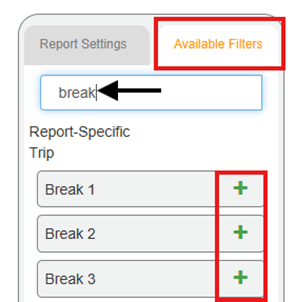
First, use the search bar under the Available Filters tab to find the appropriate Break filter option(s). Then click the green “+” to add filter option to the report:
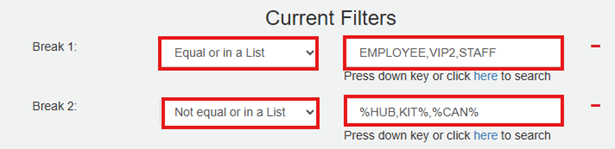
Next, add the appropriate values to the filter:
- The default comparison options are Equal or in a List and Not equal or in a List.
- To filter more than one value, enter comma delimited list
- Use the wildcard “%” to filter partial values. For example,
- %HUB – filters any values ending with ‘HUB’
- KIT% - filters any value beginning with ‘KIT’
- %CAN% - filters any value containing ‘CAN’
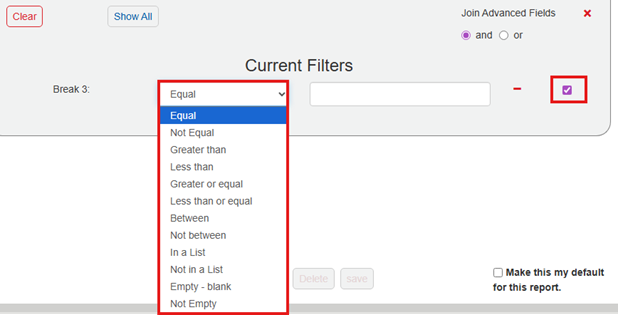
For advanced filter comparison options, click filter logic button, then check box to open additional options as shown below:

Filtering UDIDs
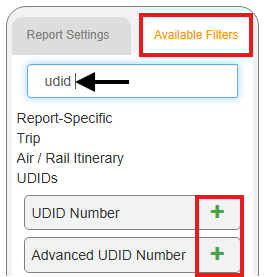
First, use the search bar under the Available Filters tab to find the appropriate UDID filter option(s). Then click the green “+” to add filter option to the report:
Next, add the appropriate UDID Number and UDID Text value to the filter:
- Use UDID Number filter option for basic filtering that offers ‘Equal’ default only.
- i.e. – UDID 74 = 123-ABC-456-DEF
- To filter more than one UDID value, use the pipe “|” as a separator (instead of a comma delimited list)
- i.e. – UDID 46 = Recruiter|Contractor


- Use Advanced UDID Number feature for Equal or Not Equal comparison options:

Was this article helpful?
That’s Great!
Thank you for your feedback
Sorry! We couldn't be helpful
Thank you for your feedback
Feedback sent
We appreciate your effort and will try to fix the article