How to Adjust iBank Break Settings
IMPORTANT NOTES:
- Break field settings cannot be managed at a report level.
- Break fields must be managed at a user level and will apply to all standard reports that allow break fields.
- Custom reports are not affected by settings and must have break fields built into the individual reports.
Adjusting Break Field Settings:
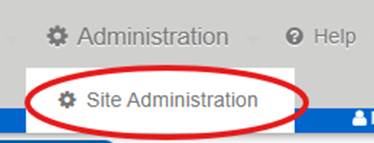
Toward top right-hand corner of the screen, hover mouse over Administration, then click Site Administration:
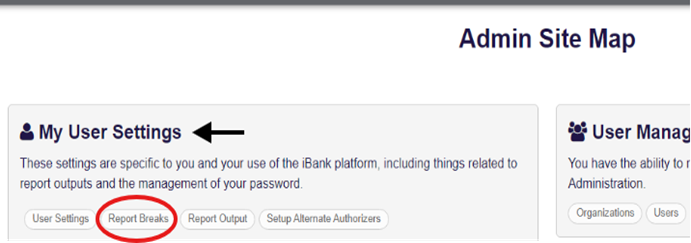
From the Admin Site Map page, click Report Breaks under My User Settings:
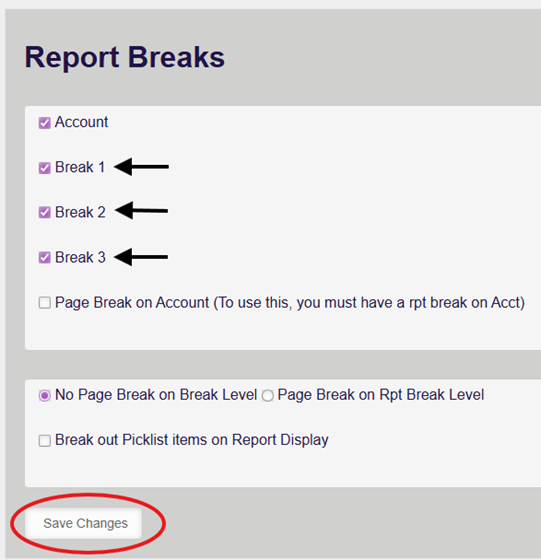
From the Report Breaks section, check or uncheck Break options as needed. Then, click Save Changes.
- Reports will reflect the options saved and settings will stay in place unless manually updated by the user.
NOTE:
- There is also the option of Page Break by Account or Break Level.
- The ‘Break out Picklist items on Report Display’ simply allows Picklist details to be displayed on reports, instead of Picklist name only.
Once changes are saved, run reports normally.
Was this article helpful?
That’s Great!
Thank you for your feedback
Sorry! We couldn't be helpful
Thank you for your feedback
Feedback sent
We appreciate your effort and will try to fix the article